

Business internet failover in Australia helps organisations maintain network access when their primary internet connection stops working. A suitable Peplink router can use two or more WAN connections, monitor their availability and move network traffic to a working connection when the primary link fails. Depending on the router, this backup can come from another fixed internet service, a 4G LTE connection or a 5G connection.
For Australian businesses that rely on EFTPOS, cloud applications, VoIP, online bookings and remote access, a second internet connection can reduce the impact of an outage. This guide explains how business internet failover works, how to plan an effective backup connection and which Peplink Balance routers may suit different business requirements.
Why Australian Businesses Need Backup Internet
Internet access supports many parts of daily business operations. Retailers use it for EFTPOS and point of sale systems, professional services depend on cloud applications, while warehouses and offices use internet connections for inventory systems, communications and remote access. When the main connection fails, several business functions can stop at the same time.
Australian businesses can experience network outages due to damaged cables, equipment faults, power interruptions, severe weather and other telecommunications problems. The Australian Government advises businesses not to rely on a single form of communication during an outage. It also recommends considering different service providers or two SIM cards from different providers as part of business continuity planning.
A backup internet connection gives a business another route to access online services when the primary connection becomes unavailable. For example, an office may use NBN or fibre as its main connection and a separate 4G or 5G service as backup. A suitable router can manage both connections and direct traffic through the available WAN link.
Businesses that depend on EFTPOS, cloud accounting, customer bookings, remote monitoring and business communications should assess the impact of an internet outage before selecting their backup equipment.
An effective backup internet plan should cover three things:
- A second internet connection that does not depend on the same failure point as the primary service.
- A router that can detect connection problems and manage traffic across available WAN links.
- A power backup plan for the router, modem, network switch and other essential equipment.
For further guidance, see the Australian Government’s business advice on preparing for telecommunications network outages.
How a Business Internet Failover Router Works
An internet failover router connects to a primary internet service and at least one additional WAN connection. The primary connection normally carries business traffic. The router also monitors the connection so it can detect when the internet path becomes unavailable.
When the primary service fails its configured health checks, the router can direct traffic through the backup WAN connection. This may be a second fixed line, a compatible cellular modem or another supported internet source. Once the primary connection becomes healthy again, the router can return traffic to it according to the configured routing policy.
Peplink Balance routers support WAN health checks and intelligent failover. Depending on the model and configuration, administrators can use checks such as PING, DNS lookup or HTTP to assess WAN availability. This helps the router detect problems beyond a simple disconnected network cable.
How Peplink WAN Failover Works
The following diagram shows a typical business internet backup arrangement using NBN or fibre as the primary connection and 4G or 5G as the secondary connection.
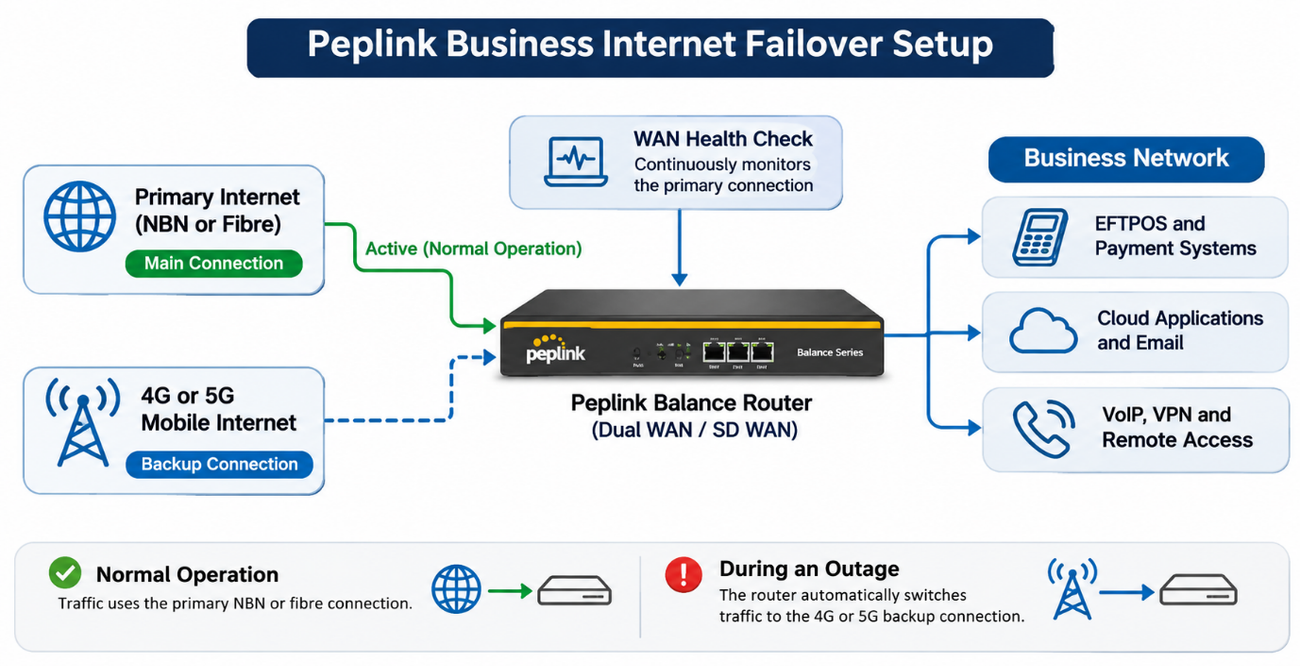
The process is straightforward:
- The primary NBN or fibre connection carries normal business traffic.
- The Peplink router checks the health of the primary internet connection.
- If the connection becomes unavailable, the router moves traffic to the backup WAN link.
- Business devices continue to use the available internet connection, subject to the backup service’s capacity.
- When the primary connection becomes healthy again, traffic can return according to the configured failback policy.
The actual switching time depends on health check intervals, routing policies, network conditions and the application in use. Standard WAN failover does not guarantee that every existing session will remain connected. Some applications may need to reconnect when the public IP address or network route changes.
NBN, Fibre and 4G or 5G Backup Connections
Australian businesses have several options for building a second internet connection. The best setup depends on the services available at the premises, mobile network coverage, required speed and the amount of data used during an outage.
NBN or Fibre with 4G Backup
A business with NBN or fibre as its main connection can use a compatible 4G router or modem as a backup WAN source. This arrangement can suit smaller offices, retail outlets, professional services and branch locations that need a second internet path without installing another fixed line.
For example, a business may use fibre for everyday work and a separate LTE service when the primary connection fails. The backup service can support essential cloud access, emails, payment systems and business communications, subject to available mobile coverage and data capacity.
NBN or Fibre with 5G Backup
A router with 5G failover can provide an alternative to a fixed internet connection at locations with suitable 5G coverage. It can also offer higher mobile network capacity than some older LTE services, although actual performance depends on the carrier, signal quality, network congestion and the selected hardware.
The Peplink Balance 310 5G is one option for businesses that need an enterprise router with integrated 5G connectivity. Other Balance models can support compatible external cellular equipment, depending on the hardware and configuration.
Using Different Internet Providers
A second SIM from a different provider can help reduce dependence on one mobile network. However, two retail brands do not always mean two independent physical networks. Before purchasing a backup service, check the underlying network provider, coverage at the premises and the technology used by both connections.
For mobile backup, assess the following:
- 4G or 5G coverage at the actual installation location.
- Monthly data allowance and excess usage costs.
- Supported Australian cellular bands and modem variants.
- External antenna requirements for weak signal areas.
- Public IP address, APN and VPN requirements where remote access is required.
A backup connection should have enough capacity for the business activities that matter most. It does not always need to match the speed of the primary service, but it should support the essential systems during an outage.
SD WAN Routers and Multi WAN Load Balancing
An SD WAN router can manage several internet connections through one networking device. Instead of relying on one WAN path, the router can apply rules that direct traffic across available connections according to business requirements.
Peplink Balance routers support multi WAN connectivity, intelligent failover and load balancing features. Depending on the model, a business can connect services such as NBN, fibre, Ethernet and compatible cellular connections. Network administrators can then set connection priorities and traffic distribution policies.
A business may use one connection for general internet access, another for backup and an additional WAN connection for a specific application. This can provide more control over how available bandwidth is used and how the network responds to a connection fault.
A Peplink SD WAN router can also support site to site VPN connections and SpeedFusion features on eligible models and configurations. These options are relevant to organisations with multiple branches, remote offices and applications that need secure connectivity between locations.
For businesses that need a multi WAN router with load balancing, the Peplink Balance Series includes products for smaller branches, larger offices and enterprise networks.
Internet Failover vs Load Balancing
Internet failover and load balancing are related network functions, but they serve different purposes. A business should know the difference before selecting a dual WAN router.
| Feature | Internet failover | WAN load balancing |
| Main purpose | Maintain internet access when a connection fails | Distribute traffic across available connections |
| Primary connection | Normally carries traffic first | Can share traffic with other active connections |
| Backup connection | Takes over according to routing policy | Can carry traffic as part of normal operation |
| Bandwidth usage | Uses the backup link when needed | Uses multiple links according to configured rules |
| Best suited to | Business continuity and backup internet | Better use of available WAN capacity |
An internet failover router can keep a business online when its primary connection becomes unavailable. A load balancing router distributes traffic across multiple connections based on configured policies. However, ordinary load balancing does not automatically combine the speeds of two internet services into one faster connection for every individual application.
Peplink also offers SpeedFusion bandwidth bonding, which is a separate technology that can combine multiple WAN connections at packet level through a supported tunnel. It should not be confused with standard load balancing or basic WAN failover.
Which Peplink Balance Router Suits Your Business?
The best Peplink router for dual WAN depends on the number of required connections, internet speeds, network size, cellular backup requirements and application needs. A smaller branch does not need the same hardware as an enterprise data centre.
WirelessTech lists several Balance Series products in its Australian catalogue. The models below cover different network sizes and hardware requirements.
Peplink Balance Router Comparison
| Peplink model | WAN and cellular capability | Suitable application | WirelessTech listing |
| Balance 20X | One Ethernet WAN and an integrated LTE modem in specified versions. Compatible FlexModule Mini can add another WAN option. | Smaller offices and branch networks requiring cellular backup. | Confirm current supply and SKU. Not currently shown in the live Balance product listings. |
| Balance 310 | Two 2.5G Ethernet WAN interfaces according to the listed product configuration. No integrated cellular modem is specified on this listing. | Business branches requiring multi WAN routing and high speed Ethernet. | Listed. |
| Balance 310 5G | Integrated 5G modem, 10G multi gigabit WAN, configurable SFP+ WAN or LAN and additional multi gigabit interfaces. | Enterprise branches requiring high speed routing and integrated 5G backup. | Listed. |
| Balance 580X | Configurable 2.5G multi gigabit ports. Compatible external 4G or 5G equipment can provide cellular connectivity. | Larger business networks requiring flexible WAN connections and network expansion. | Listed. |
| Balance 1350 EC | Multi WAN routing, 10G fibre connectivity options and edge computing. Cellular connectivity requires a compatible external WAN arrangement. | Enterprise networks and edge computing deployments. | Listed. |
| Balance 2500 EC | Multi WAN routing, USB modem support for compatible 4G or 3G devices and 1TB onboard storage. | High capacity enterprise networks and edge computing. | Listed. |
| Balance 5000 EC | 40G or 100G interface options, multiple WAN and LAN interfaces and up to 110Gbps total stateful throughput. Cellular backup needs a separately planned WAN solution. | Large enterprises, core networks and data centre environments. | 100G version listed. |
Important: Product specifications can vary by hardware revision, modem configuration and regional SKU. Check the manufacturer’s documentation and the exact WirelessTech product listing before ordering.
Peplink Balance 20X for Smaller Business Networks
The Peplink Balance 20X is a compact multi WAN router with an integrated cellular modem in specified configurations. It has one Gigabit Ethernet WAN port and four Gigabit Ethernet LAN ports. Its FlexModule Mini slot supports additional WAN options, including compatible cellular modules.
This model can suit smaller offices and retail locations that need a fixed broadband connection with cellular backup. However, WirelessTech’s current Balance category does not show a live Balance 20X product listing, so contact the sales team to confirm supply and the correct regional modem version.
Peplink Balance 310 and Balance 310 5G for Business Branches
The standard Peplink Balance 310 and Balance 310 5G should be assessed as separate products. The standard Balance 310 listing focuses on multi gigabit Ethernet routing, dual WAN connectivity and edge computing, while the Balance 310 5G includes an integrated 5G cellular modem.
A business that needs an integrated 5G backup connection should review the Balance 310 5G specifications. A business that already has separate internet services and needs high speed Ethernet WAN connectivity can assess the standard Balance 310.
Peplink Balance 580X for Flexible WAN Connectivity
The Peplink Balance 580X provides configurable multi gigabit ports that can serve as WAN or LAN interfaces, depending on the network design. It also supports compatible Peplink cellular equipment, including external 5G solutions, which can be used as part of a backup internet arrangement.
This model can suit larger business networks that need flexible WAN configuration, PoE++ connectivity and centralised management. Confirm the required external cellular equipment, modules and SIM arrangement before ordering.
Peplink Balance 1350 EC, 2500 EC and 5000 EC for Enterprise Networks
The Balance 1350 EC and 2500 EC add edge computing capabilities for enterprise environments. The 1350 EC has 512GB of onboard storage, while the 2500 EC includes 1TB of storage for supported local applications and processing tasks.
The Balance 5000 EC serves a different class of network. It is designed for large enterprises and data centres, with 40G and 100G interface options and up to 110Gbps of total stateful throughput. These models should be assessed against the organisation’s routing capacity, WAN design and application requirements rather than treated as direct alternatives to compact cellular backup routers.
For available products, visit the WirelessTech Peplink Balance Series catalogue.
What to Check Before Purchasing a Dual WAN Router
A dual WAN router should match the actual network design and business continuity requirements. Buying a router based only on its port count or advertised throughput can lead to problems if it does not support the required cellular modem, network interfaces or business applications.
Before purchasing a router for business internet backup, check these points:
- Primary internet service: Record the current connection type, download and upload speeds, service provider and any required static IP or network settings.
- Backup connection: Confirm if the backup will use another fixed line, 4G LTE, 5G or a compatible external device.
- Network independence: Check that the backup connection does not share the same critical infrastructure or provider dependency as the primary connection.
- Cellular coverage: Test mobile coverage at the installation location and confirm the router’s supported Australian bands.
- Traffic requirements: Identify the systems that must remain available, such as EFTPOS, cloud software, VoIP, VPN and remote access.
- Data allowance: Estimate the backup data required during an outage and check the mobile plan’s usage limits.
- Power backup: Include the router, modem, ONT, switches and other essential network equipment in the UPS plan.
- Management and support: Check firmware access, remote management, warranty and eligible PrimeCare or EssentialCare options.
Pro tip: Run a planned failover test before relying on the system. Check whether EFTPOS transactions, cloud applications, VPN access and VoIP calls continue or need to reconnect. Record the time taken to switch connections and review the result with your network administrator.
Frequently Asked Questions About Business Internet Failover
What is business internet failover in Australia?
Business internet failover is a network setup that uses a secondary internet connection when the primary connection becomes unavailable. A compatible router checks the health of the WAN connections and directs traffic through a working link according to the configured policy.
Do I need a dual WAN router for backup internet?
A dual WAN router is a common way to manage a primary and backup internet service. It can connect two fixed internet services or a fixed service and a compatible cellular connection. Check the available WAN interfaces and external modem support before purchasing.
Can a Peplink router automatically switch from NBN to 4G or 5G?
Yes, compatible Peplink models can use intelligent failover to move traffic to an available backup connection when the primary WAN fails its configured health checks. The cellular connection must be connected, configured and supported by the particular router model.
Which Peplink router is best for dual WAN?
The best Peplink router for dual WAN depends on the required throughput, number of WAN connections, cellular needs and network size. The Balance 20X may suit smaller branches with integrated LTE, the Balance 310 supports dual WAN Ethernet connections, and the Balance 580X offers flexible multi gigabit WAN configuration. The Balance 310 5G is an option for businesses that need integrated 5G connectivity.
Will EFTPOS continue working during an internet outage?
EFTPOS may continue working if its payment terminal has a separate mobile connection or the business network switches successfully to a working backup internet service. Check the terminal’s connectivity options with the payment provider and test transactions during a planned failover test.
Is load balancing the same as internet failover?
No. Load balancing distributes traffic across multiple internet connections according to configured policies. Internet failover directs traffic to another connection when the preferred WAN becomes unavailable. A router may support both functions, but they serve different purposes.
Does a 5G router provide a reliable backup for NBN?
A 5G router can provide an alternative internet path when the NBN connection fails, provided there is suitable 5G coverage and sufficient data allowance at the premises. Performance depends on signal strength, network congestion, carrier availability and the router’s hardware. Test the connection at the actual installation location before relying on it as a backup.
Request a Quote for a Peplink Router for Business Internet Backup
A suitable backup internet setup depends on the business’s primary connection, required backup capacity and network equipment. WirelessTech supplies Peplink Balance Series routers for different business and enterprise requirements, including multi WAN routing, cellular connectivity and high capacity network deployments.
Contact our team with your current internet service, backup connection type, required router model and business application. We can help confirm the listed product details, current availability, pricing and relevant Care Plan options.
Contact WirelessTech
Phone: +61 2 8605 7787
Email: sales@wirelesstech.com.au
Website: www.wirelesstech.com.au