

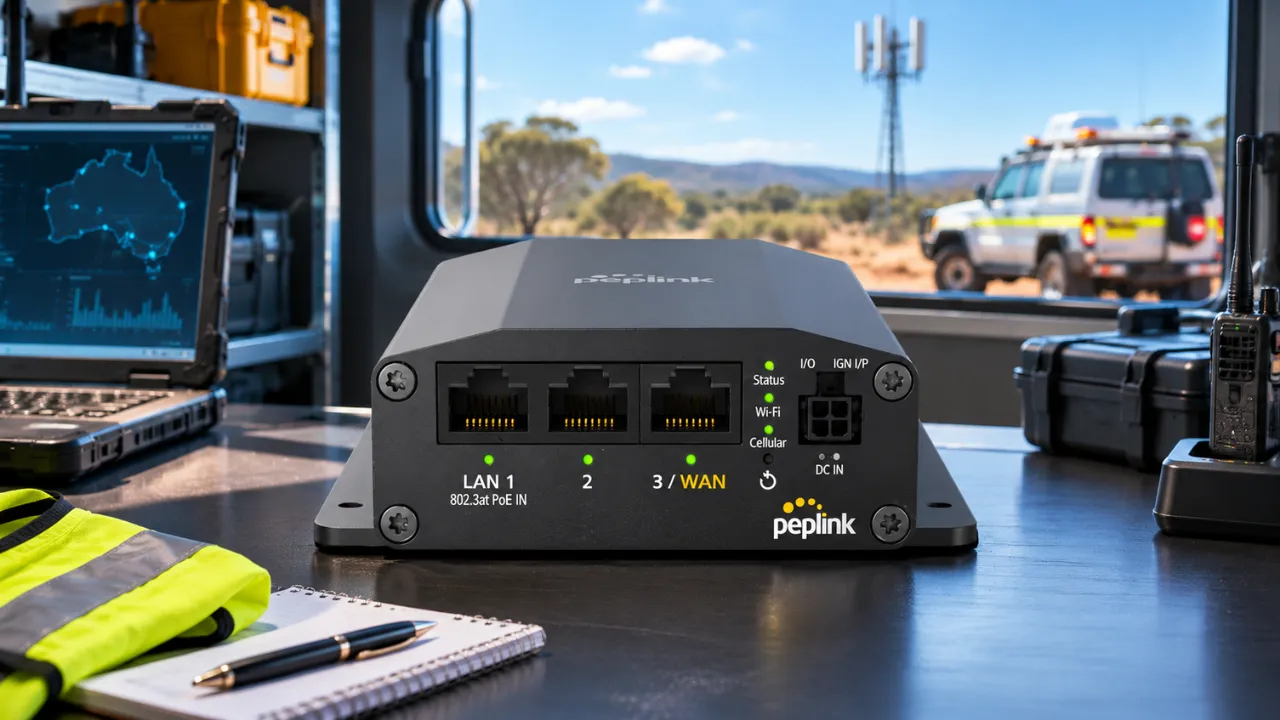
The right 5G router for business depends on how many mobile connections you need, where the equipment will operate and how your network must respond to a service outage. A compact BR1 Mini 5G can suit a small remote site, while a BR2 Pro offers two independent 5G modems for applications that need two active cellular connections. The HD1 Dome Pro suits outdoor installations, and the Transit range serves transport and fleet applications.
The most important point is the difference between SIM redundancy and modem redundancy. A router with one 5G modem and two SIM slots can switch between SIM cards, but it cannot use both SIMs at the same time. A dual modem router can maintain two separate cellular connections at once, with each modem using its own SIM. This difference can affect network uptime, carrier diversity and the level of connectivity available to your business.
What is a Business 5G Cellular Router?
A business 5G cellular router connects a local network to the internet through a mobile network. It uses a SIM card or supported eSIM profile to establish a cellular WAN connection, then shares that connection with equipment such as computers, cameras, payment terminals, access points and industrial devices. Many business routers also support Ethernet WAN, Wi Fi WAN, VPN connections and remote network management.
Unlike a basic mobile hotspot, a business cellular router is designed to form part of a managed network. It can support fixed installations, vehicles, temporary work sites and remote facilities. Depending on the model, the router may also provide multiple Ethernet ports, external antenna connections, ignition sensing, GPS and advanced WAN management.
A 5G connection does not automatically make a router suitable for every business. The number of modems, available WAN ports, antenna design, power input and network compatibility all affect its role. A small retail site may need one cellular connection with a backup SIM, while a mobile command vehicle may need two independent 5G links.
Dual SIM vs Dual 5G Modem Routers
This is one of the most important differences to check before you order a Peplink cellular router. The number of SIM slots tells you how many physical SIM cards the device can accept. It does not tell you how many cellular connections the router can operate at the same time.
A single modem router can hold two SIM cards and switch between them. For example, one SIM may use Telstra and the second may use another mobile network. The router uses one SIM at a time. The second SIM provides an alternative connection when the first network or service becomes unavailable, subject to the router’s configuration and failover settings.
A dual modem router works differently. It has two independent cellular modems, and each modem can maintain its own mobile connection. This allows the router to use two mobile networks at the same time, such as one connection through Telstra and another through Optus. It can then manage traffic across both WAN links or use one as a backup, based on the network policy.
SIM slots and modem count at a glance
| Router type | Cellular modems | SIM arrangement | Active cellular links |
| Single modem with two SIM slots | 1 | Two SIMs assigned to one modem | 1 |
| Dual modem with four SIM slots | 2 | Two SIMs assigned to each modem | 2 |
SIM and modem comparison diagram
A single modem can switch between its two assigned SIMs. A dual modem router has two separate cellular paths, with one active SIM on each modem. The spare SIM for each modem remains available for a switch.
Diagram: Single modem vs dual modem
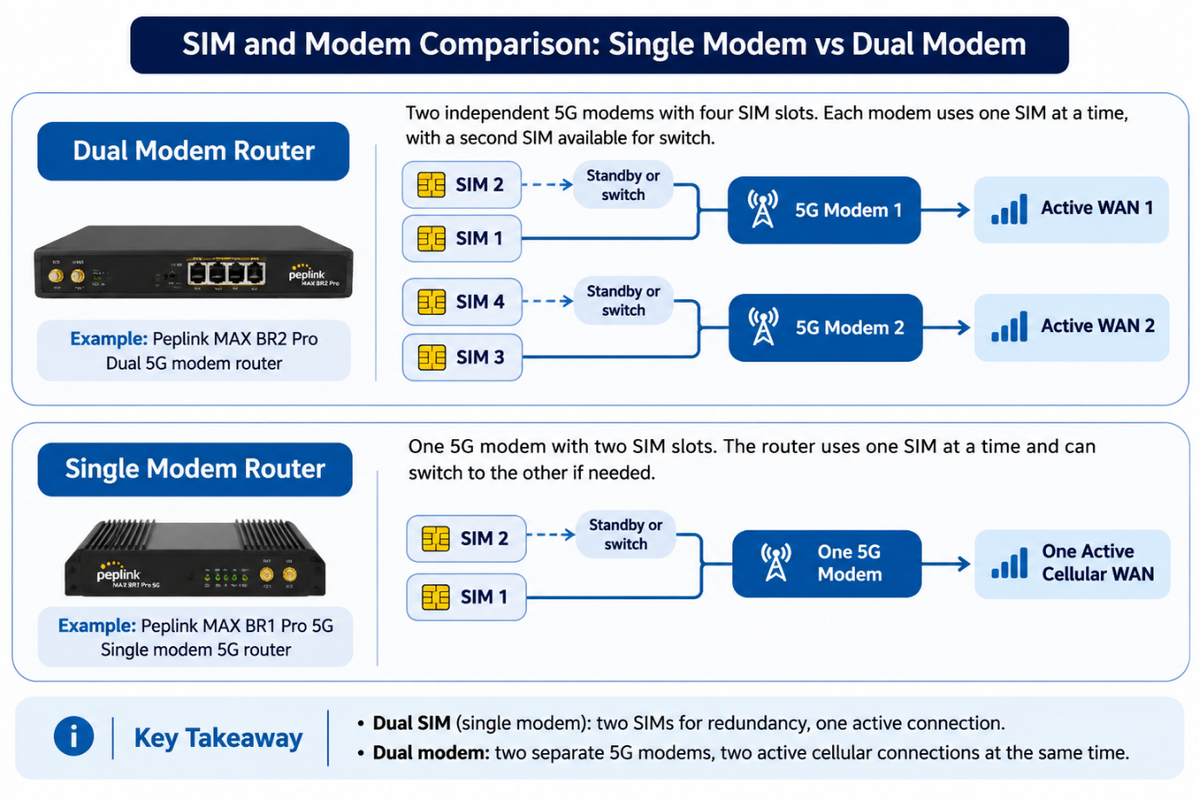
The Peplink MAX BR2 Pro is a good example of a dual modem design. It has two 5G modems and four SIM slots. Each modem can use its assigned pair of SIMs, but only one SIM per modem can be active at a time. The result is two active cellular connections, not four. Peplink confirms this arrangement in its BR2 Pro FAQ and technical documentation.
PRO TIP
For carrier redundancy, consider SIM cards from different mobile networks. Two SIM cards from the same provider may still depend on the same mobile network infrastructure. Separate carriers can provide more useful network diversity, but coverage at the installation site must still be checked.
Peplink BR1 Mini vs BR1 Pro 5G vs BR2 Pro
The Peplink BR1 family covers compact cellular routers through to higher performance mobile and branch models. The BR1 Mini LTE Cat 4 is an LTE option for basic connectivity, while the BR1 Mini 5G adds 5G in a compact format. The BR1 Pro 5G offers a more capable single modem platform, and the BR2 Pro adds a second 5G modem for two active cellular paths.
The right model depends on the network requirement, not just the advertised 5G speed. A business that needs one connection with a backup SIM may not need a dual modem router. A fleet operator that must keep two different mobile networks active may have a stronger case for the BR2 Pro.
MAX BR1 Mini LTE Cat 4
The MAX BR1 Mini LTE Cat 4 HW3 is a compact LTE router listed in WirelessTech’s current BR range. It uses one cellular modem with two SIM slots, so it can switch between SIM cards but cannot use both as separate active mobile connections. The Cat 4 model is suited to basic remote access, point of sale, kiosks and IoT equipment where LTE performance meets the application requirement.
The HW3 version has two SMA cellular antenna connectors and supports vehicle related features such as ignition sensing. It is an LTE model, not a 5G router. The current WirelessTech listing includes the product code MAX-BR1-MINI-LTE-MX-T-PRM, so check the exact variant before comparing it with other BR1 Mini models.
MAX BR1 Mini 5G
The MAX BR1 Mini 5G is a compact 5G router with one 5G modem and two SIM slots. It supports 5G Standalone and Non Standalone modes in the listed 5GN global variant. It also has four SMA cellular antenna connectors, which allow a suitable external 4×4 MIMO antenna system to be connected.
Peplink lists the BR1 Mini 5G in a version with Wi Fi and a version without Wi Fi. The Wi Fi option is linked to the HW2 model and provides Wi Fi 5. This matters when the router must provide local wireless access as well as cellular internet. The manufacturer lists the product, but it was not shown in WirelessTech’s current BR category at the time of this review, so confirm supply before presenting it as an available option.
MAX BR1 Pro 5G
The MAX BR1 Pro 5G is a single modem 5G router for branch sites, mobile work areas and business networks. It has one 5G modem with two SIM slots, four cellular antenna connectors, Wi Fi 6 and Ethernet WAN and LAN interfaces. A suitable external antenna can help when the router needs to sit inside a vehicle or building while the antenna is mounted in a better signal location.
Peplink lists several BR1 Pro 5G product codes, including MAX-BR1-PRO-5GN-T-PRM and MAX-BR1-PRO-5GK-T-PRM. These versions support 5G SA and NSA, but the exact band list and carrier approvals must be checked against the SKU. WirelessTech currently lists both BR1 Pro 5G and BR1 Pro 5GK options in its BR category.
MAX BR2 Pro Dual 5G
The MAX BR2 Pro is designed for applications that need two active cellular WAN links. It has two 5G modems, four physical SIM slots and eight SMA cellular antenna connectors. Each modem uses one SIM at a time and can switch to its second assigned SIM when required. This gives a business two independent cellular connections, with SIM redundancy available on each modem.
The BR2 Pro also provides two 2.5Gbps Ethernet WAN ports, four Gigabit Ethernet LAN ports, Wi Fi 6, GPS and ignition sensing. Its power options include 10 to 30V DC, a 12V power supply and supported PoE input. The product code currently listed by WirelessTech is MAX-BR2-PRO-5GK-T-PRM. This is the stronger option for mobile networks, transport applications and remote sites where two mobile carriers must remain active.
Peplink BR1 and BR2 comparison
| Model | Modems | SIM slots | Cellular antenna connections | Best fit |
| MAX BR1 Mini LTE Cat 4 HW3 | 1 LTE | 2 | 2 SMA | Basic LTE, POS, IoT and kiosks |
| MAX BR1 Mini 5G | 1 5G | 2 | 4 SMA | Compact 5G sites and mobile use |
| MAX BR1 Pro 5G | 1 5G | 2 | 4 SMA | Business branches and mobile networks |
| MAX BR2 Pro Dual 5G | 2 5G | 4 | 8 SMA | Two active mobile networks and fleet connectivity |
The figures above describe the modem and SIM layout, not guaranteed internet speed. Actual throughput depends on the mobile network, signal quality, antenna installation, carrier capacity, data plan and router configuration.
To view current BR models, visit the Peplink Business Rugged BR Series at WirelessTech.
Cellular Routers for Vehicles and Fleet Connectivity
A vehicle cellular router needs more than a mobile data connection. It must handle vehicle power, vibration, antenna placement, ignition control and the network needs of equipment inside the vehicle. A public transport vehicle may need passenger Wi Fi and fleet management, while a service vehicle may need secure access to job systems, cameras and remote monitoring equipment.
The BR1 Pro 5G and BR2 Pro can support mobile installations. The BR2 Pro is the stronger fit when two 5G modems must remain active. Its wide DC input range and ignition sensing support vehicle installations, while its external antenna connectors allow the antenna system to be mounted away from the router.
The Transit Pro E is another option for transport and industrial mobile environments. It has one 5G modem, two SIM slots, four SMA cellular antenna connectors, Wi Fi 6, GPS, a serial interface and ignition input. It is a single modem 5G router, so its two SIM slots provide SIM redundancy rather than two active 5G connections.
What about the MAX Transit Duo Pro?
WirelessTech also lists the MAX Transit Duo Pro. It is a dual cellular router, but its current listed version uses two LTE Cat 12 modems. It is not a 5G router. This distinction matters when a fleet specification calls for two active cellular links and 5G support at the same time. The Transit Duo Pro can provide two LTE connections, while the Transit Pro E provides one 5G modem with SIM redundancy.
The older MAX Transit Mini appears in legacy product searches, but it is not listed in WirelessTech’s current Transit category. Treat it as a legacy model and check its exact product code, modem type, bands and hardware revision before considering it for a new deployment.
For current transport models, see the Peplink Transit Series at WirelessTech.
Peplink Routers for Remote Sites and Industrial Applications
Remote sites often have limited access to fixed broadband. Examples include rural offices, temporary work areas, construction compounds, monitoring stations, farm facilities and equipment enclosures. A cellular router can provide the primary internet connection or act as a backup when the fixed connection fails.
For a small remote site, the BR1 Mini 5G can provide a compact gateway with one cellular modem. The BR1 Pro 5G offers a more capable router for a branch or site network with several connected devices. Where two independent mobile connections are required, the BR2 Pro provides two active 5G WAN links and more antenna connections.
The HD1 Dome Pro 5G serves a different purpose. It is an outdoor cellular router with an IP67 rated enclosure and four integrated cellular antennas. The embedded antenna design reduces the need for long cellular antenna cables, which can introduce signal loss. It is suited to outdoor installations where the router can be mounted on a pole or wall and connected to the indoor network over Ethernet.
PRO TIP
Do not treat every rugged router as an outdoor weatherproof router. A metal enclosure, shock resistance or vehicle certification does not automatically mean a device has an IP67 rating. Check the exact model’s ingress protection rating before installing it in a location exposed to rain, dust or water.
For outdoor installations, see the Peplink Dome Series at WirelessTech.
Cellular Routers with External Antenna Support
A cellular antenna has a direct effect on the quality of a mobile connection. A router placed inside a metal cabinet, vehicle or building may receive a weaker signal than an antenna mounted outside. External antenna support allows the router and antenna to sit in different locations, which can help improve signal reception when the antenna has a clearer path to the mobile tower.
The BR1 Mini LTE Cat 4 HW3 has two SMA cellular antenna connectors. The BR1 Mini 5G and BR1 Pro 5G have four cellular antenna connectors, while the BR2 Pro has eight. The Transit Pro E also has four SMA cellular antenna connectors. These connections give installers more flexibility when they use a suitable external antenna system.
The HD1 Dome Pro uses four integrated cellular antennas instead of conventional external SMA cellular antenna ports. The router itself is mounted outdoors, which keeps the cellular antenna close to the point of reception. This can be useful on rooftops, poles, vehicles and outdoor equipment enclosures where long coaxial antenna cables would add complexity or signal loss.
What should you check before installing an external antenna?
- Connector count: Match the antenna system to the router’s cellular modem and connector layout.
- MIMO support: A 4×4 MIMO 5G router needs a compatible antenna system and correct connection layout.
- Cable length: Long coaxial runs can reduce signal strength. Keep the cable route short where possible.
- Antenna placement: Mount the antenna clear of metal obstructions and other sources of interference.
- Band coverage: Confirm that the antenna supports the mobile bands used by the selected carrier.
WirelessTech lists Peplink antenna options and accessories for cellular installations. See the Peplink Antennas and Accessories category.
When to Use a Peplink MAX Adapter 5G
The MAX Adapter 5G is not a standalone business router. It is a cellular adapter that adds a 5G WAN connection to compatible equipment through USB. It can connect to supported Peplink routers and firewalls, or provide cellular connectivity to compatible Windows and Linux devices. It does not replace a full router when the site needs its own Ethernet LAN, Wi Fi access point and network management functions.
The MAX Adapter 5G has one 5G modem, two SIM options for redundancy, four SMA cellular antenna connectors and USB C power. A business with an existing router may use it to add a cellular WAN without replacing the main network hardware. Compatibility with the host router must be checked before purchase, as not every router or USB port supports the adapter.
The BR1 Pro 5G and BR1 Mini 5G can also work as cellular adapters in suitable network configurations, but they remain full router platforms. The MAX Adapter 5G has a more specific role: adding a mobile connection to a compatible host device.
How to Select a 5G Router for Australian Networks
A router described as global or 5G capable is not automatically compatible with every Australian mobile service. The exact hardware SKU must support the frequency bands used by the carrier at the installation location. The router must also support the required 5G mode, such as Non Standalone or Standalone, and the LTE bands used by the carrier where 5G NSA depends on an LTE anchor.
Australian network bands differ by carrier. Telstra’s July 2026 Wireless Application Development Guidelines identify 850MHz n26, 2.6GHz n7 and 3.6GHz n78 among its 5G frequency bands. The same guide identifies 700MHz n28, 1800MHz n3 and 2100MHz n1 for Optus. These details show why the product code and carrier band list matter more than a general claim of global compatibility.
Many current Peplink 5GN and 5GK variants support 5G SA and NSA across a broad Sub 6GHz band range. However, older product codes can have a different band list or support NSA only. For example, Peplink lists the HD1 Dome Pro codes ending in 5GD and 5GH as NSA variants, while the 5GN variant supports SA and NSA. The same care applies to the BR1 Pro and BR2 Pro. Check the full product code rather than relying on the product family name alone.
Australian 5G compatibility checklist
Before you order a router, confirm these details:
- Carrier bands: Check the 5G and LTE bands used by Telstra, Optus or Vodafone at the installation address.
- 5G mode: Confirm support for SA, NSA or both, based on the carrier service and application.
- SIM type: Check physical Nano SIM, eSIM and any required carrier provisioning.
- Antenna system: Match the antenna to the router’s connector count, MIMO support and frequency range.
- Power input: Confirm the power supply, DC voltage range, PoE requirement and ignition wiring for vehicle installations.
- Data plan: Check the plan’s data allowance, speed policy, public IP requirements and business use conditions.
- Coverage: Check mobile coverage at the actual site, not just the town or postcode.
Power is another point that can affect the installation. The BR2 Pro supports a wide DC input range and compatible PoE power, while the Transit Pro E includes vehicle related features such as ignition sensing. The BR1 Mini range has its own power and ignition requirements. Always check the wiring and power specification for the exact hardware revision before a permanent installation.
A well matched router should support the carrier bands, antenna system and network design that the site needs. A higher modem count can provide more connection options, but it also adds hardware and installation cost. Start with the number of active cellular links required, then match the router to the site and its operating conditions.
Frequently Asked Questions
Which Peplink router supports 5G?
Peplink offers several 5G models, including the MAX BR1 Mini 5G, MAX BR1 Pro 5G, MAX BR2 Pro, MAX HD1 Dome Pro 5G and Transit Pro E 5GN. Each model has a different modem layout, antenna design and installation role. Check the full product code to confirm the 5G bands and SA or NSA support.
Does a dual SIM 5G router use both SIM cards at the same time?
Not always. A single modem router with two SIM slots can use one SIM at a time and switch to the other when required. The MAX BR2 Pro is different because it has two 5G modems and four SIM slots, allowing two active cellular connections, with one active SIM per modem.
Is the Peplink BR2 Pro a dual SIM router?
The BR2 Pro has four physical SIM slots, arranged as two SIMs for each of its two 5G modems. Each modem can use one of its assigned SIMs at a time. This gives the router two active 5G connections, not four.
Which Peplink router is suitable for a vehicle?
The BR1 Pro 5G, BR2 Pro and Transit Pro E can all suit mobile installations, depending on the network requirement. The BR2 Pro provides two active 5G modems, while the Transit Pro E provides one 5G modem with transport related features such as GPS, serial connectivity and ignition sensing. The installation must also account for vehicle power, antenna placement and vibration.
Does the MAX HD1 Dome Pro have external antenna connectors?
The MAX HD1 Dome Pro uses four integrated cellular antennas in its outdoor enclosure. It is designed to place the router and antennas at the outdoor reception point, which helps avoid long cellular antenna cable runs. It is IP67 rated, but the installer should still check the correct mounting and Ethernet protection accessories for the site.
Is the Peplink MAX Transit Duo Pro a 5G router?
The current MAX Transit Duo Pro listed by WirelessTech is a dual Cat 12 LTE router, not a 5G model. It has two LTE modems. The Transit Pro E is the current Transit model in WirelessTech’s category that uses one 5G modem.
What is the difference between a Peplink router and the MAX Adapter 5G?
A Peplink router creates and manages a network for connected devices. The MAX Adapter 5G adds a cellular connection through USB to compatible routers, firewalls or supported computers. It is not a replacement for a standalone router when the site needs Ethernet LAN ports and built in Wi Fi.
Will a Peplink 5G router work with Telstra or Optus?
Compatibility depends on the exact hardware SKU and the mobile bands used by the carrier at the site. Check the product’s 5G and LTE band lists, SA or NSA support, SIM requirements and carrier coverage before ordering. A global product label alone is not enough to confirm network compatibility.
Is the MAX Transit Mini still available?
The MAX Transit Mini is an older model and does not appear in WirelessTech’s current Transit Series category. Availability may depend on remaining stock or existing hardware. Check the full product code and modem type before using it in a new installation.
Which Peplink Router Should Your Business Consider?
For a compact remote site or small network, the BR1 Mini 5G offers a 5G connection in a small router. The BR1 Pro 5G suits a branch or mobile installation that needs a more capable single modem router. For two active mobile networks, the BR2 Pro provides two independent 5G modems and four SIM slots.
For an outdoor installation, the HD1 Dome Pro offers an IP67 enclosure and integrated cellular antennas. For transport and fleet applications, the Transit Pro E provides 5G connectivity with vehicle related interfaces. The MAX Adapter 5G is the option for a compatible existing router or computer that needs an added 5G WAN rather than a new network gateway.
WirelessTech supplies Peplink networking products from Australia. Contact the team to discuss a Peplink 4G or 5G router for your business, confirm the correct Australian network variant and request a quote.
Request a quote: sales@wirelesstech.com.au
Phone: +61 2 8605 7787