

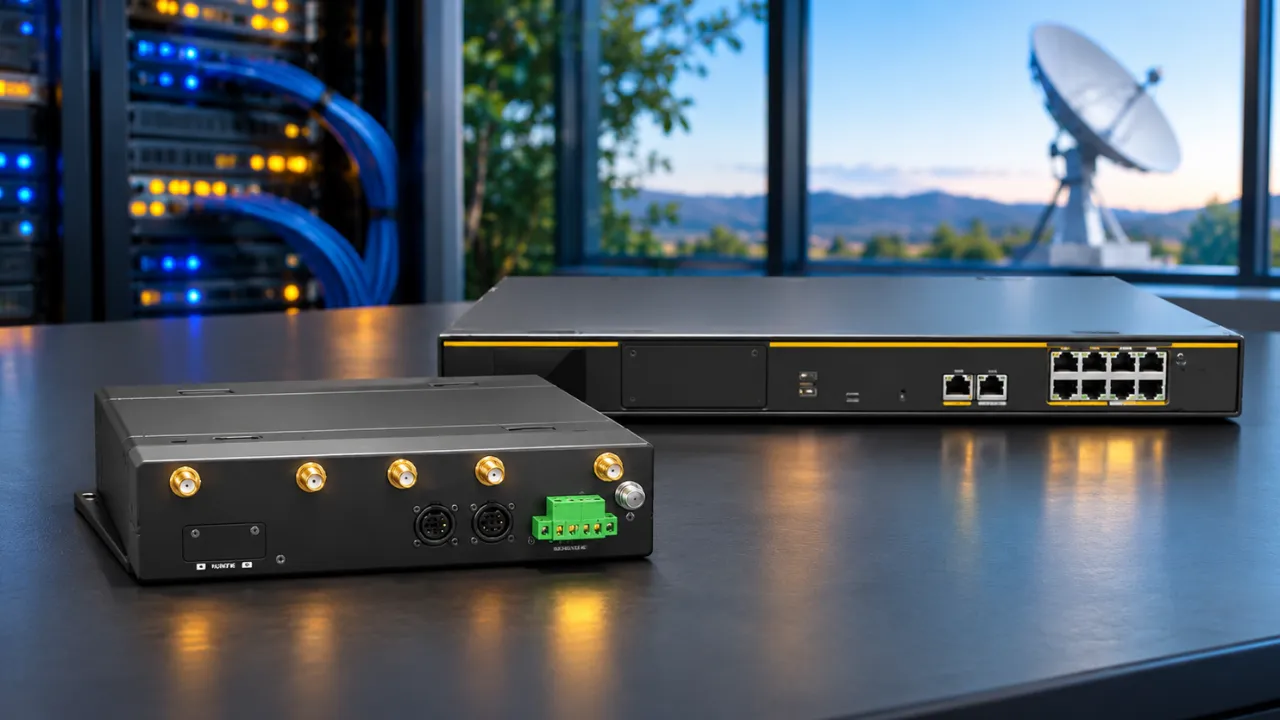
Peplink SpeedFusion bonding combines multiple internet connections into one secure tunnel. It sends data packets across available WAN links and rebuilds the traffic at a remote Peplink endpoint. This allows a single network session to use the combined capacity of fibre, Starlink, 4G or 5G connections.
This is different from ordinary WAN load balancing and internet failover. Load balancing distributes separate network sessions across available connections. Failover moves traffic to another link when the main connection fails. SpeedFusion can combine bandwidth at packet level and also offers features such as WAN Smoothing and Hot Failover.
For an Australian business, the right setup depends on the network problem. A company with several users may only need load balancing. A regional site with one primary internet connection may need failover. A remote operation that needs higher throughput from several connections may benefit from SpeedFusion bonding.
What is Peplink SpeedFusion?
Peplink SpeedFusion is a technology that creates a secure connection between two Peplink endpoints. It can use several WAN links to carry data through one logical tunnel. The technology supports bandwidth bonding, WAN Smoothing and Hot Failover, with the available features depending on the router, firmware and licence entitlement.
A typical setup has one Peplink router at the business site and a remote endpoint at another office, a data centre or a cloud service. The local router sends traffic through its available internet connections. The remote endpoint receives the packets, reassembles the traffic and routes it towards the destination network or the internet.
This remote endpoint is essential. A single Peplink router at one site cannot create a bonded internet connection by itself. It needs a compatible remote peer to complete the SpeedFusion tunnel. That peer can be another physical Peplink router, a self hosted FusionHub appliance or Peplink’s SpeedFusion Connect cloud service.
What does SpeedFusion provide?
Peplink groups several network functions under SpeedFusion:
Bandwidth Bonding combines multiple WAN connections at packet level. It allows a single supported session to use the combined capacity of the available links.
WAN Smoothing sends redundant packets over multiple WAN paths to reduce the impact of packet loss and unstable connections. It can help applications such as live video and voice services, although it uses extra bandwidth.
Hot Failover maintains a SpeedFusion connection across available WAN links. When one path fails, traffic can continue through a healthy path, helping preserve active sessions.
These functions address different network needs. A business may use bonding to increase available bandwidth, smoothing to improve performance on unstable links, and Hot Failover to protect important sessions. The correct configuration depends on the applications and the quality of each WAN connection.
How WAN Bonding Combines Multiple Internet Connections
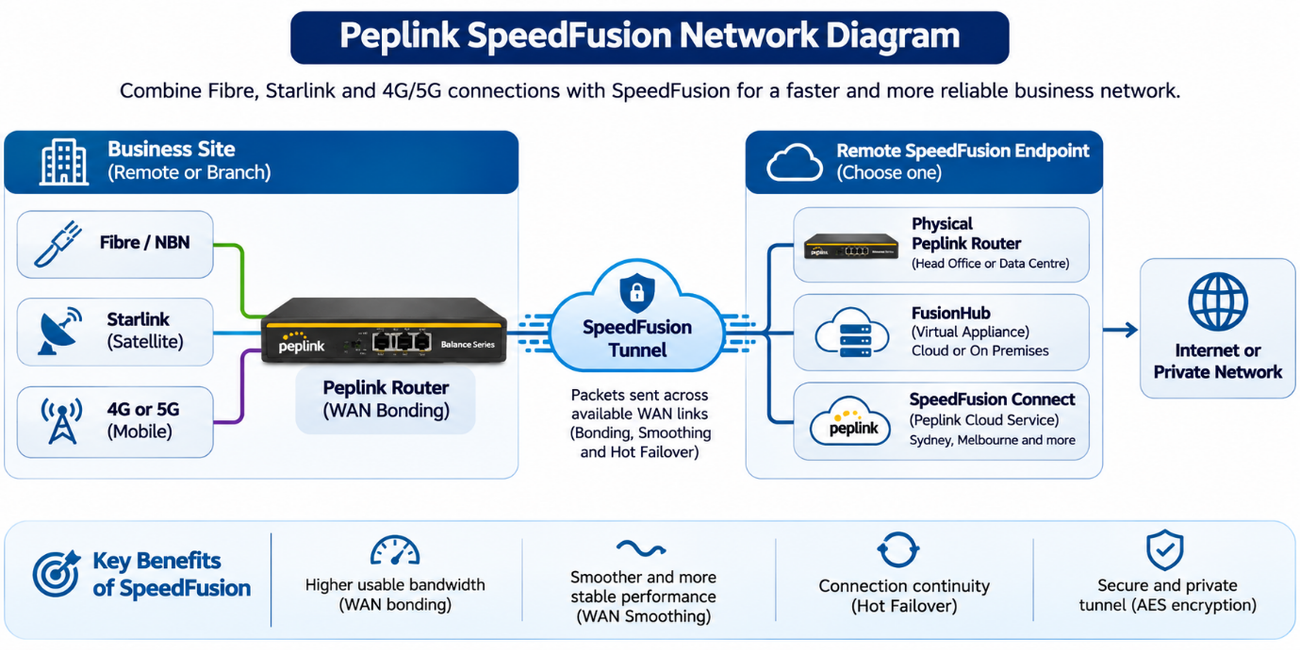
A WAN bonding router can use several internet connections at the same time. For example, a remote site may have fibre as its main connection, Starlink as another WAN and 5G as a third path. SpeedFusion can carry traffic across those links through one tunnel to a remote peer.
The router breaks the data into packets and distributes them across the available paths. The receiving endpoint puts the traffic back into the correct order before forwarding it to the destination. From the application’s point of view, the connection uses one logical path rather than several separate internet links.
This is useful when one internet service cannot meet the site’s bandwidth requirement. It can also help when the available connections have different performance levels. A business may combine a fixed broadband service with satellite and mobile connectivity rather than rely on one provider or one access technology.
However, bonding does not guarantee that the final speed will equal the sum of every advertised WAN speed. Real throughput depends on link capacity, latency, packet loss, tunnel overhead, router performance, remote peer capacity and any service plan limits. A congested or unstable connection can also affect the overall result.
Example: Bonding fibre, Starlink and 5G
Consider a regional business with fibre, Starlink and a 5G connection. Each service reaches the Peplink router through a separate WAN interface. The router builds a SpeedFusion tunnel across the available links, then sends the tunnel traffic to a remote endpoint.
The remote endpoint may sit in the company’s head office, a hosted data centre or a Peplink cloud location. It receives and reassembles the traffic before sending it to the internet or the business network. The business can then use the combined connection for supported sessions, subject to the available bandwidth and network conditions.
PRO TIP
Check the upload and download capacity of every link before planning a bonded network. A connection with high download speed but poor upload capacity may limit applications such as cloud backups, video calls, remote desktop access and file transfers.
WAN Bonding vs Load Balancing vs Internet Failover
These three methods can use the same WAN connections, but they do not work in the same way. A business should not assume that a router with load balancing will combine the speed of its internet services for one download or application session.
WAN load balancing distributes separate sessions across the available connections according to configured rules. It can make better use of several internet links when many users and applications are active. However, a single ordinary session will usually remain on one WAN connection to maintain a consistent route and public IP address.
Standard internet failover has a different purpose. The router monitors the health of its WAN links and moves traffic to another available connection when the primary link fails. This can restore internet access, but an existing session may need to reconnect if the public IP address or route changes.
SpeedFusion bonding works at packet level through a tunnel to a remote peer. It can distribute packets from one session across multiple WAN links and reassemble them at the other end. SpeedFusion also includes Hot Failover, which can help keep active sessions alive when a WAN path becomes unavailable.
Technical comparison
| Feature | WAN load balancing | Standard internet failover | SpeedFusion bonding |
| Main purpose | Distribute traffic across WAN links | Keep internet access available after a link failure | Combine WAN capacity through one tunnel |
| Traffic handling | Distributes separate sessions | Moves traffic to a healthy link | Distributes packets across WAN paths |
| One session uses combined bandwidth | No, not through ordinary load balancing | No | Yes, with supported bonding configuration |
| Remote peer required | No | No | Yes |
| Uses multiple links at once | Yes, across separate sessions | Usually one preferred link at a time | Yes, within the SpeedFusion tunnel |
| Session continuity | Depends on routing and session persistence | Existing sessions may reconnect | Hot Failover can preserve active sessions |
| Typical application | Offices with many users | Backup internet access | Remote sites, high availability and higher throughput |
When should a business use each method?
Use WAN load balancing when several users share multiple internet services and the goal is to distribute their traffic. It can help an office use fibre and 5G more efficiently across web access, cloud apps, video meetings and other sessions.
Use standard failover when a business wants a backup connection to take over after the main internet service fails. This is often suitable for retail sites, small offices and other locations where a second internet link is available but does not need to carry traffic all the time.
Use SpeedFusion bonding when the business needs a single supported session to use multiple WAN links. It is relevant to remote operations, live video, mobile networks, cloud applications and sites that need a stronger combined connection.
There is no need to treat these methods as competitors. A Peplink network can use load balancing for ordinary internet traffic, failover for backup access and SpeedFusion for selected applications that need bonding or session protection.
Using Starlink, Fibre and 4G or 5G with SpeedFusion
SpeedFusion can work with different types of internet access, provided the router, firmware, WAN interfaces and remote peer support the required setup. A business could connect fibre, Starlink and a mobile service to one Peplink router and use them as paths for the same SpeedFusion tunnel.
This is useful for sites where fixed broadband alone cannot meet the business requirement. Construction projects, mining support facilities, regional offices, temporary work sites and mobile operations may have access to different connection types. Combining them can improve available bandwidth and provide more than one path to the remote endpoint.
The quality of the connection still matters. Fibre may offer stable performance, while Starlink and mobile networks can vary with congestion, weather, signal strength and local network conditions. SpeedFusion can manage traffic across these different paths, but it cannot create capacity that the underlying services do not provide.
A practical network design
| WAN connection | Possible role | Network point to check |
| Fibre or business broadband | Main fixed internet path | Upload speed, latency and service availability |
| Starlink | Satellite WAN path | Obstructions, service plan and local network conditions |
| 4G or 5G | Mobile backup or additional bonded path | Coverage, signal quality, data allowance and antenna placement |
| Second fixed broadband service | Additional capacity and carrier diversity | Provider infrastructure and route diversity |
A second service from the same provider may still share parts of the same network infrastructure. For stronger resilience, assess the physical routes and providers behind each WAN connection, not just the number of connections shown in the router dashboard.
Peplink also documents SpeedFusion for Starlink deployments. Its guidance explains that the router initiates an outbound tunnel, so the setup does not depend on a Starlink business service solely to obtain a static IP address for the tunnel. The rest of the network design, router feature entitlement and remote endpoint still need to be checked.
SpeedFusion Connect vs FusionHub
A SpeedFusion tunnel needs a remote peer. For many businesses, the main decision is how to provide that endpoint. Peplink offers SpeedFusion Connect as a hosted cloud service and FusionHub as a virtual appliance that the customer can run in its own cloud or server environment.
Both can act as the remote endpoint for a SpeedFusion network, but they suit different IT requirements. SpeedFusion Connect removes the need to deploy and manage a separate endpoint appliance. FusionHub gives the business more control over hosting, routing and the location of the remote endpoint.
Peplink SpeedFusion Connect
Peplink SpeedFusion Connect provides access to Peplink hosted SpeedFusion endpoints. A business can use the service without purchasing and maintaining a separate remote Peplink router or running its own FusionHub virtual machine. This can simplify deployments for small and medium sized businesses that need bonding without managing cloud infrastructure.
Peplink lists Sydney and Melbourne among its Australian SpeedFusion Connect locations. The service also has endpoints in other regions. The selected endpoint can affect latency and the route taken by traffic, so the business should test performance from its site rather than assume one location will always give the best result.
SpeedFusion Connect operates under usage plans. The plan can set a data allowance, validity period and maximum throughput. WirelessTech currently lists quota based plans and unlimited monthly and yearly plans. The listed unlimited options specify up to 400 Mbps, while several quota plans specify up to 200 Mbps. These are plan limits, not guaranteed real world speeds.
A SpeedFusion Connect plan is attached to a device serial number. Peplink states that each device needs its own plan to use the service. Some Peplink Care plans may also include a SpeedFusion Connect usage allowance, but the allowance can vary by model and purchase. Check the router’s entitlement before adding a separate plan.
Peplink FusionHub
FusionHub is Peplink’s virtual SpeedFusion appliance. A business can install it on a supported cloud platform such as AWS, Microsoft Azure or Google Cloud, or run it on suitable on premises infrastructure. It acts as the remote peer for Peplink routers and gives the IT team control over the endpoint location and network routing.
FusionHub can suit businesses with several branches, service providers and organisations that need their own cloud or data centre endpoint. The licence is based on supported throughput and the number of peers. The hosting environment also needs enough processing power, network capacity and storage for the intended traffic.
WirelessTech currently lists FusionHub Essential for up to five SpeedFusion peers and FusionHub Pro for up to 20 peers. Its listings show these options with one year of EssentialCare. Larger FusionHub options are also listed. The correct licence depends on the number of sites, expected throughput and network design.
SpeedFusion Connect vs FusionHub
| Requirement | SpeedFusion Connect | FusionHub |
| Remote endpoint | Peplink hosted cloud | Customer hosted virtual appliance |
| Extra hardware | No separate endpoint appliance | Runs on cloud or on premises server |
| Hosting management | Managed by Peplink | Managed by the customer or service provider |
| Licence model | Usage based plan | FusionHub licence based on throughput and peer count |
| Hosting charge | Included within the service plan | Cloud or server hosting costs may apply |
| Endpoint control | Select from available Peplink locations | Greater control over hosting location and routing |
| Suitable for | Simpler cloud bonding deployments | Multiple sites, private cloud and managed networks |
Which option suits your network?
SpeedFusion Connect is a practical option when the business wants a cloud hosted endpoint without running its own server. FusionHub is more suitable when the IT team needs control over the endpoint, has several remote sites or already operates cloud infrastructure.
A physical Peplink router at another office can also act as the remote peer. This can suit a branch to head office design, provided both ends have the required hardware and SpeedFusion feature entitlement. Peplink does not require every business to use a cloud subscription, but the router and licensing requirements still apply.
How InControl2 Helps Manage Peplink Networks
Peplink InControl2 is a cloud based network management platform. It gives network teams a central view of connected Peplink devices and helps them monitor status, manage settings, push configuration updates and review network information. Peplink also refers to the platform as InControl, while InControl2 remains a useful search term and product reference.
For a business with several branches or remote sites, central management can reduce the need to log in to each router separately. An IT team can review device status, monitor WAN connections, manage configurations and access the web administration interface remotely. Peplink also supports zero touch provisioning and configuration tools for building SpeedFusion VPN networks.
InControl2 does not replace the SpeedFusion tunnel or act as its remote peer. It manages the Peplink network, while the router and remote endpoint carry the traffic. This distinction matters when planning the network architecture and the services required for it.
For example, an Australian company with a head office in Sydney and remote depots in regional areas could use InControl2 to monitor its Peplink routers from one management platform. Each site could use fibre, Starlink or mobile connectivity, while SpeedFusion provides the tunnel to the selected remote endpoint.
Peplink PrimeCare, Warranty and SpeedFusion Licensing
Peplink PrimeCare is a Care Plan for eligible PrimeCare devices. It is not a generic licence that applies to every Peplink router. Peplink identifies PrimeCare models by product codes ending in -PRM. Devices outside that group may need EssentialCare or EssentialCare+ and separate software licences, depending on the model and feature.
For eligible PrimeCare devices, the plan can include hardware warranty, access to InControl, firmware upgrades, FusionHub licences and SpeedFusion licences for the relevant term. The exact benefits depend on the Care Plan and the device. Some models may also include a SpeedFusion Connect usage allowance.
PrimeCare and PrimeCare+ have different support and hardware replacement terms. Standard PrimeCare includes standard return merchandise authorisation and 8 × 5 support. PrimeCare+ includes advance hardware replacement and 24 × 7 support tickets. Check the current Peplink Care Plan terms before you select a plan.
If a PrimeCare subscription expires, the device can continue to operate, but the PrimeCare benefits no longer apply. This can affect support, warranty coverage, cloud management and the licences supplied under the Care Plan. A business should confirm the renewal date and any separate software requirements before the plan ends.
What should you check before ordering?
- Product code: Check if the router is a PrimeCare model with the required -PRM product code.
- SpeedFusion entitlement: Confirm that the required bonding, smoothing or Hot Failover feature is enabled for the model and firmware.
- Remote peer: Decide if the endpoint will be another Peplink router, FusionHub or SpeedFusion Connect.
- Peer capacity: Check the number of remote sites and the FusionHub peer licence requirement.
- Cloud usage: Confirm the SpeedFusion Connect data allowance, speed limit and plan period.
- Support terms: Check the Care Plan, warranty and hardware replacement conditions for the exact device.
Peplink’s current documentation identifies some entry level models, including BR2, BR2 Micro, B One and BR1 Mini, that require PrimeCare or a feature pack to enable SpeedFusion bonding. This is why the product code and licence status matter. Do not assume that every Peplink router has the same bonding features enabled by default.
WirelessTech lists Peplink routers, FusionHub licences, SpeedFusion Connect plans and support options. The team can help confirm the correct combination for the proposed network.
Which Peplink Router Supports SpeedFusion?
Peplink offers SpeedFusion capable platforms across several product groups, including Balance, BR, Transit, Dome and other enterprise routers. The right platform depends on the number of WAN connections, required throughput, physical installation and the type of remote peer.
The Peplink Balance Series is relevant to branch offices and business networks that need multi WAN routing. The Business Rugged BR Series and Transit Series suit mobile and remote installations. The final choice should account for the model’s supported SpeedFusion features, firmware and licence entitlement, rather than the product family name alone.
A router can support SpeedFusion VPN without every SpeedFusion feature being available under its current licence. Some models support Hot Failover or WAN Smoothing but need an added feature pack or Care Plan for bandwidth bonding. Check the product data sheet and licensing terms for the exact SKU.
For current hardware options, view the Peplink Balance Series and Peplink Business Rugged BR Series.
For cloud and licensing options, see SpeedFusion Cloud Connect, SpeedFusion Connect SIM Plans and FusionHub Licensing.
Frequently Asked Questions
What is Peplink SpeedFusion bonding?
Peplink SpeedFusion bonding combines multiple WAN connections in one secure tunnel. It sends packets across the available links and reassembles them at a remote peer. This allows a single supported session to use the combined capacity of those connections.
What is the difference between WAN bonding and load balancing?
WAN load balancing distributes separate network sessions across available internet connections. SpeedFusion bonding distributes packets from a single session across multiple WAN links through a tunnel. Ordinary load balancing does not combine the bandwidth of several connections for one standard session.
Does SpeedFusion require a second Peplink router?
SpeedFusion requires a remote peer, but that peer does not have to be another physical router. It can be another Peplink router, a self hosted FusionHub instance or Peplink SpeedFusion Connect. The right option depends on the number of sites, hosting requirements and ongoing costs.
Can Peplink SpeedFusion combine Starlink and 5G?
Yes, a compatible Peplink router can use Starlink and 5G as WAN paths for a SpeedFusion tunnel. It can also combine fibre or other supported internet connections. Check the WAN interface capacity, modem support, router licence, data plans and remote peer before deploying the setup.
Does SpeedFusion increase internet speed?
SpeedFusion bonding can increase the available throughput for a supported session by using several WAN connections. Actual results depend on the performance of each link, latency, packet loss, tunnel overhead, router capacity, remote peer capacity and any cloud plan limit. It does not guarantee that the combined speed will equal the sum of every advertised connection speed.
What is SpeedFusion Connect?
SpeedFusion Connect is Peplink’s hosted cloud service for SpeedFusion endpoints. It lets a compatible Peplink router connect to a Peplink cloud endpoint without a business deploying its own FusionHub or remote router. Usage plans have their own data, speed and validity terms.
What is the difference between SpeedFusion Connect and FusionHub?
SpeedFusion Connect is a Peplink hosted service. FusionHub is a virtual appliance that the customer can run in its own cloud or server environment. SpeedFusion Connect reduces infrastructure work, while FusionHub gives the organisation more control over hosting and routing.
What is FusionHub used for?
FusionHub acts as a remote SpeedFusion endpoint. It can run on supported cloud infrastructure or on premises hardware and connect several Peplink sites through secure tunnels. Its licence depends on throughput and the number of peers supported.
What is Peplink InControl2?
InControl2 is Peplink’s cloud based network management platform. It helps teams monitor devices, review network status, push configuration changes and manage distributed Peplink networks from a central dashboard. It does not replace the SpeedFusion tunnel or remote peer.
Does Peplink PrimeCare include SpeedFusion bonding?
PrimeCare includes SpeedFusion and FusionHub licences for eligible PrimeCare models, subject to the Care Plan terms. Some other models use EssentialCare or EssentialCare+ and may need separate software licences or feature packs. Confirm the exact model and product code before ordering.
Does SpeedFusion bonding need a subscription?
Not in every setup. A physical Peplink router can act as a remote peer without a cloud service subscription, although hardware and licence requirements still apply. FusionHub has its own licence and may have hosting costs. SpeedFusion Connect uses a cloud usage plan, and some router models need PrimeCare or a feature pack to enable bonding.
Can I use SpeedFusion with only one internet connection?
A SpeedFusion tunnel can operate over one WAN path, but bandwidth bonding needs multiple active paths to combine their capacity. With one connection, the business may still use other SpeedFusion functions if the router, remote peer and licence support them. The main benefit of bonding comes from having more than one usable WAN connection.
Plan Your Peplink SpeedFusion Network with WirelessTech
The right SpeedFusion design starts with the WAN connections already available at the site and the result the business needs. A network that needs more capacity from fibre, Starlink and 5G has different requirements from one that only needs a backup path when the primary connection fails.
WirelessTech supplies Peplink Balance and BR Series routers, SpeedFusion Connect plans, FusionHub licences and support options for Australian businesses. Speak with the team about the number of WAN links, expected throughput, remote peer location and licence requirements before you finalise the network design.
Speak with WirelessTech about Peplink SpeedFusion, cloud connectivity and WAN bonding requirements.
Phone: +61 2 8605 7787
Email: sales@wirelesstech.com.au
Address: Unit 2, 38 Powers Road, Seven Hills NSW 2147, Australia