

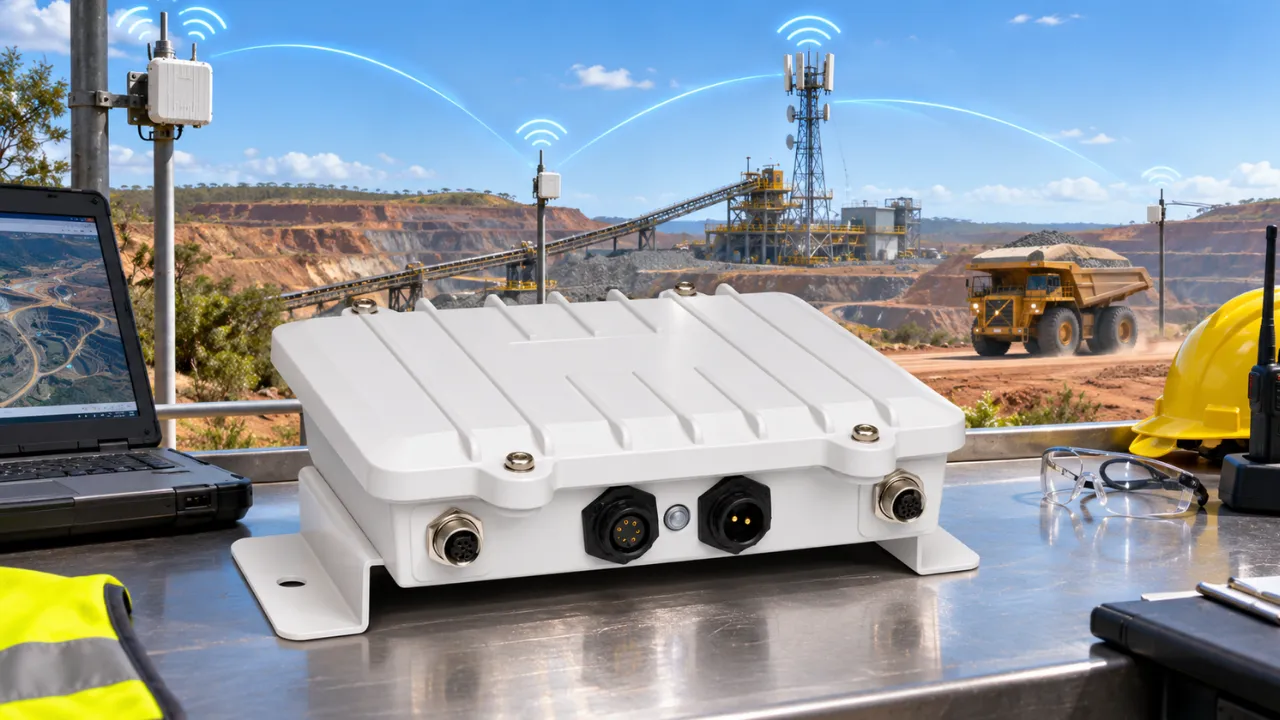
An industrial wireless mesh network connects fixed infrastructure, mobile equipment and remote field devices across a large operating site. It uses wireless nodes to carry data between network locations, with gateways providing links to the core network or other communication systems. For mining operations, this can support fleet management, vehicle telematics, video surveillance, SCADA, asset monitoring and field communications.
Hitachi Energy’s TRO600 portfolio includes different types of industrial wireless equipment. The TRO610 is a compact cellular router for cabinet and field installations. The TRO620 combines cellular connectivity with an optional broadband mesh radio, while the TRO670 is an outdoor hybrid router with cellular, broadband mesh and partner radio capabilities.
The right device depends on its position in the network. A cellular router at a remote cabinet has a different job from an outdoor mesh node on a pole or a mobile router fitted to a mining vehicle. This guide compares the TRO600 models, explains the earlier ABB Tropos and TropOS range, and covers the main network design points for Australian mining and industrial sites.
Why Mining Operations Need Industrial Wireless Networks
An open pit mine can cover a large area, with equipment and people moving between excavation zones, haul roads, workshops, processing facilities and site offices. These areas need reliable communication for systems that monitor equipment, report vehicle locations and support operational decisions. A standard office Wi Fi network or a single cellular router may not provide the coverage, mobility or network control required across the full site.
A mining wireless network may need to connect fixed cameras, programmable logic controllers, remote sensors, field automation devices and mobile equipment at the same time. Some devices remain in one cabinet for years, while others move with haul trucks, graders and service vehicles. The network must support those different locations without forcing the operator to rebuild the entire communications system each time a work area changes.
Industrial conditions add further demands. Dust, heat, vibration, moisture, electrical interference and limited power access can affect equipment and radio performance. Network design must account for these conditions, along with coverage between nodes, backhaul capacity, application priorities and the security controls required by the site’s IT and operational technology teams.
Common applications across a mining site
An industrial wireless network can carry several types of traffic across the same infrastructure, provided the network has enough capacity and suitable traffic separation.
| Application | Network requirement |
| Fleet management | Reliable communication with mobile equipment and fleet systems |
| Vehicle telematics | GPS, status updates, diagnostics and equipment data |
| IP video surveillance | Sufficient throughput and stable links for camera streams |
| SCADA and process control | Secure communication with controllers and field devices |
| Environmental monitoring | Connectivity for sensors and remote monitoring points |
| Worker communications | Network access across workshops, buildings and operating areas |
| Asset monitoring | Regular data collection from pumps, conveyors and other equipment |
A network engineer should assess the traffic generated by each application. A camera network can use much more bandwidth than a simple sensor connection. Critical control traffic may also need stricter latency, availability and security rules than general user access.
How an Industrial Wireless Mesh Network Works
A wireless mesh network uses connected radio nodes to carry traffic across a site. A gateway node connects the mesh to the core network, while other nodes extend coverage and provide access for local devices. Depending on the product and network design, traffic can travel through more than one wireless path before reaching its destination.
This architecture can reduce the need to run fibre or copper to every remote location. A node near a conveyor, pump station or field cabinet can connect wirelessly to another mesh node, which then forwards traffic towards a gateway. Where the design includes alternate paths, the network can route around a failed or unavailable link.
Mesh coverage still needs proper planning. Each wireless hop adds capacity and performance considerations, and a long chain of nodes can reduce the bandwidth available to end devices. A strong design uses suitable gateway locations, enough backhaul capacity and overlapping radio coverage where network resilience requires it.
Fixed nodes, mobile nodes and gateways
A fixed node can sit on a pole, building, control cabinet or other suitable structure. It extends the wireless network to nearby devices and can connect to other nodes over the mesh. Some fixed nodes can also serve as gateways, injecting wired or fibre capacity into the network.
A mobile node is installed in a vehicle or another moving asset. It connects to the network as it travels through covered areas. This can give fleet systems and vehicle equipment access to site applications without relying on a separate mobile broadband service for every device.
The gateway links the wireless network to the site backbone, data centre or operations network. It may connect through fibre, Ethernet, private cellular or another suitable backhaul service. The best design depends on the distance between nodes, radio conditions, traffic volume and the location of existing network infrastructure.
Industrial wireless mesh topology diagram
The following example shows how a mine can connect fixed and mobile nodes to a central operations network. It is an illustrative design, not a claim that every TRO600 model performs every role shown. The TRO670 is suited to outdoor hybrid mesh roles, while the TRO620 can provide a cabinet mounted mesh and cellular connection. The TRO610 is suited to cellular connectivity for field devices.
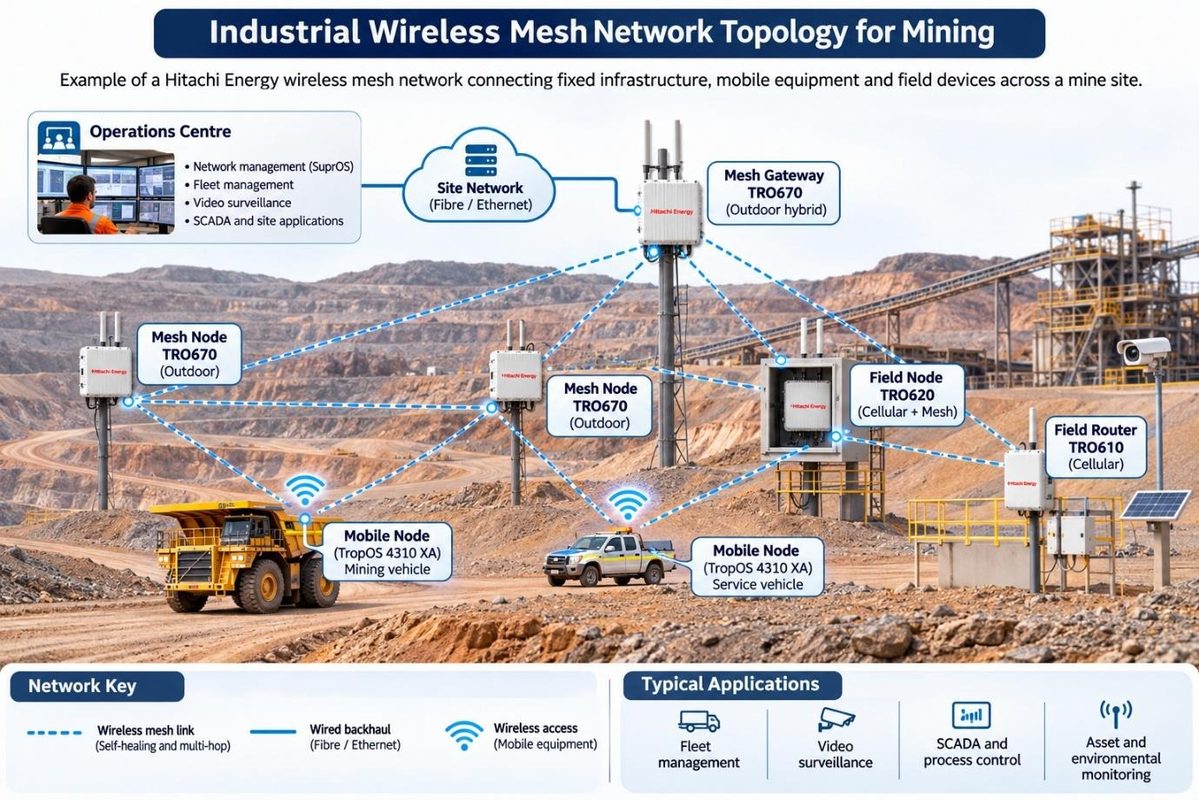
In a real installation, the number of nodes and wireless paths depends on the site survey and application requirements. The diagram shows possible network roles rather than a standard deployment layout.
Hitachi Energy TRO600 Wireless Router Portfolio
Hitachi Energy’s TRO600 portfolio builds on the Tropos industrial wireless foundation. It combines cellular connectivity with broadband mesh and other radio options across different product models. This lets network designers use a suitable router for a cabinet, remote outdoor location or industrial field network instead of treating every site as the same installation.
WirelessTech currently lists the TRO610, TRO620 and TRO670 in its Wi Fi Mesh Systems category. The three models have distinct roles. The TRO610 is a cellular router, the TRO620 adds an 802.11 broadband mesh option, and the TRO670 brings cellular, outdoor mesh and partner radio capabilities into one enclosure.
Hitachi Energy TRO610 cellular router
The TRO610 is a compact cellular router designed for DIN rail mounting. It connects field devices and remote equipment to public or private cellular networks. Its small form factor makes it useful in control cabinets, distribution infrastructure and industrial sites where a cellular gateway is needed close to the equipment.
The published TRO610 specification lists up to two Gigabit Ethernet interfaces, serial connectivity and optional Bluetooth for local sensor connections. Its cellular radio options support 2G, 3G, 4G and private LTE across selected bands. The current product information describes it as an IP30 rated device, normally installed inside a cabinet rather than exposed to outdoor weather.
The TRO610 is not the same as a broadband mesh router. Its main role is cellular connectivity for field devices and industrial applications. It can form part of a wider wireless network, but the product specification should not be read as a claim that it provides the same mesh radio functions as the TRO620 or TRO670.
View the Hitachi Energy TRO610 cellular router at WirelessTech.
Hitachi Energy TRO620 broadband mesh and cellular router
The TRO620 is a DIN rail mounted router for industrial cabinets and field area networks. It combines public or private cellular connectivity with an optional 802.11 broadband mesh radio. This gives network designers the option to use cellular connectivity, mesh backhaul or both, depending on the model configuration and network plan.
Its published features include 2×2 MIMO broadband mesh, four Gigabit Ethernet interfaces and serial connections for legacy field devices. The cellular radio supports selected 2G, 3G, 4G and private LTE networks. The product also includes edge computing support, remote firmware updates and security features such as a Trusted Platform Module, zone based firewall and VPN options.
The TRO620 has an IP30 rating and is normally installed inside a cabinet. It can connect industrial controllers, intelligent electrical devices and SCADA equipment to a wider network. For a mine, it may suit a control cabinet or field automation point that needs cellular access and a mesh connection to other network nodes.
View the Hitachi Energy TRO620 broadband mesh and cellular router at WirelessTech.
Hitachi Energy TRO670 outdoor mesh and cellular router
The TRO670 is the outdoor hybrid model in the TRO600 range. It combines cellular connectivity, Wi Fi, broadband mesh and support for selected partner radios. Its 2×2 MIMO broadband mesh operates across 2.4 GHz and 5 GHz options, allowing it to extend wireless coverage or link remote assets into a wider network.
The model supports public and private LTE, dual SIM configuration, Ethernet and serial interfaces. It also supports third party radio integration and edge computing options. Its IP67 rated enclosure is designed for outdoor mounting on suitable infrastructure such as poles, towers and other remote locations. An optional battery backup can support communications during some power interruptions.
The TRO670 can suit a remote outdoor site where cellular coverage alone is not enough or where a mesh link is needed to reach nearby assets. Before specifying it, confirm the exact radio and cellular configuration, frequency support, antenna arrangement and power options for the product code being supplied.
View the Hitachi Energy TRO670 outdoor mesh and cellular router at WirelessTech.
Hitachi Energy TRO610 vs TRO620 vs TRO670
The three routers have different jobs within an industrial communications network. The TRO610 is primarily a cellular router, the TRO620 combines cellular access with a broadband mesh option, and the TRO670 is an outdoor hybrid model. The right device depends on the installation point and the network role required at that location.
| Feature | TRO610 | TRO620 | TRO670 |
| Main role | Compact cellular router | DIN rail cellular and mesh router | Outdoor hybrid mesh and cellular router |
| Installation | DIN rail, cabinet | DIN rail, cabinet | Outdoor mounting |
| Cellular options | Selected 2G, 3G, 4G and private LTE variants | Selected 2G, 3G, 4G and private LTE variants | Public and private cellular, exact variant to confirm |
| Broadband mesh | Not listed as a core feature | Optional 802.11 mesh radio | 2×2 MIMO mesh at 2.4 GHz and 5 GHz |
| Ethernet | Up to 2 Gigabit Ethernet | 4 Gigabit Ethernet | Dual Ethernet interfaces |
| Serial interfaces | Yes | Yes | Yes |
| SIM support | Model configuration dependent | Model configuration dependent | Dual SIM configuration |
| Environmental rating | IP30 | IP30 | IP67 |
| Common role | Cellular field gateway | Cabinet based mesh and cellular point | Outdoor mesh extension and remote coverage |
PRO TIP
Do not select a TRO600 model by its product family name alone. Check the exact hardware and radio options, including cellular bands, mesh frequency, SIM configuration and environmental rating. A cabinet mounted IP30 router and an outdoor IP67 router are built for different installation conditions.
Wireless Mesh Networks for Mining and Remote Infrastructure
Mining operations can use a wireless mesh network to connect moving equipment and fixed assets across a changing work area. As excavation moves, network nodes may need to be relocated to maintain coverage near the active pit, haul routes and temporary work zones. A network that supports mobile nodes and multiple paths can reduce the need for a complete rebuild each time the site changes.
The same design principles apply to utilities, oil and gas operations, processing facilities and remote infrastructure. A field area network can connect controllers, telemetry devices, cameras and sensors across geographically separated locations. A mix of cellular and mesh links can provide a practical way to reach locations that do not have direct fibre access.
Australian iron ore mine case study
WirelessTech has published a case study about an Australian iron ore mine that used an ABB Tropos wireless mesh network to support critical mining applications. The site operated around the clock and needed communications for fleet management, vehicle telematics, fuel polling, video cameras, lightning alerts and mobile access.
The case study reports more than 60 fixed Tropos routers around the mine and over 300 mobile Tropos nodes installed in vehicles such as graders, surface miners, haul trucks and light vehicles. Some fixed routers were mounted on poles with solar panels, while other nodes were installed on relocatable trailers so coverage could move with the excavation area.
The network supported the mine’s CAT MineStar system and connected mobile equipment with site applications. The case study also describes centralised monitoring through Tropos Control. It is a useful example of why mining networks need more than a few access points: the design had to support fixed infrastructure, mobile equipment, changing work zones and several operational applications across a large site.
This case study documents an earlier ABB Tropos deployment, not a current TRO600 installation. It shows the role industrial mesh technology has played in Australian mining and provides a practical reference when planning a network upgrade.
Read the Australian iron ore mining wireless mesh case study.
ABB Tropos and Legacy TropOS Wireless Networks
ABB completed its acquisition of Tropos Networks in June 2012. Tropos developed wireless broadband products for distribution networks and other critical infrastructure. ABB added this technology to its communications portfolio, which served the power, transport, mining and public infrastructure sectors.
In September 2020, Hitachi ABB Power Grids announced the next generation Tropos TRO600 portfolio. The new range built on the earlier Tropos wireless foundation and combined cellular, self healing broadband mesh and partner radio technologies in a hybrid architecture. The current product brand is Hitachi Energy, while ABB Tropos and TropOS remain relevant terms for organisations searching for earlier equipment and network documentation.
WirelessTech’s current Wi Fi Mesh Systems catalogue lists several TropOS products alongside the TRO600 routers. These include the TropOS 4310 XA, 2420, 2410, 1420, 6420 and 6420 XA. Their presence in the catalogue makes them relevant to enquiries about existing networks, replacement units and expansion planning. It does not by itself confirm stock or suitability for a particular network.
Legacy TropOS models listed by WirelessTech
| Model | Product role | Main application |
| TropOS 4310 XA | Mobile broadband mesh router | Mobile network access for vehicles and moving assets |
| TropOS 2420 | Dual radio DIN rail mesh edge node | Industrial field area networks and automation |
| TropOS 2410 | Single radio DIN rail mesh edge node | 2.4 GHz industrial mesh applications |
| TropOS 1420 | Outdoor mesh edge node | Outdoor field networks and remote devices |
| TropOS 6420 | Outdoor broadband mesh router | Mesh gateway or network extension |
| TropOS 6420 XA | Rugged outdoor mesh router | Demanding industrial and hazardous environment applications |
The TropOS 2420 is a dual radio node with 2.4 GHz and 5 GHz broadband mesh capability. Its listed features include a managed four port Ethernet switch, serial interfaces, GPS, voltage monitoring and contact closure monitoring. The TropOS 2410 is a single radio version that operates in the 2.4 GHz band.
The TropOS 1420 and 6420 are outdoor mesh products. The 1420 uses dual band 802.11 wireless and supports field automation connections. The 6420 can operate as a mesh gateway or as a node that extends network coverage. The 6420 XA adds a rugged design for demanding environments and supports remote antenna mounting options.
The TropOS 4310 XA is listed as a mobile broadband mesh router. It is relevant to older deployments that used vehicle mounted mesh nodes. Before using any legacy model in a new installation, confirm the hardware revision, radio frequencies, firmware, power requirements and compatibility with the rest of the network.
Can old TropOS nodes work with the TRO600 range?
Some backward compatibility is documented, but it should not be assumed across every model and network. Hitachi Energy states that the TRO670 supports the TRO600 range and previous fourth generation Tropos products. Its SuprOS documentation also lists support for third and fourth generation TropOS devices as well as TRO600 products.
That does not mean every legacy TropOS node will connect to every TRO600 model in every configuration. Radio frequency, hardware revision, firmware, network topology and software support all matter. A network that has operated for years may also use regional radio settings or site specific configurations that need review before new devices are added.
A staged upgrade is often safer than replacing every node at once. Start with an inventory of the installed products and software, then check the proposed replacement or expansion models against the current network design. Confirm the migration plan with the manufacturer or a qualified network engineer before changing a production mining network.
Network Management with Hitachi Energy SuprOS
SuprOS is Hitachi Energy’s network management system for its wireless communications and selected automation products. It provides central monitoring and management for TRO600 and supported TropOS devices, along with other Hitachi Energy equipment such as the RTU500 range. This gives network teams a central place to review device status, configuration, security and firmware.
For a mining operation with many fixed and mobile nodes, central management can reduce manual work across the site. Engineers can view device locations, monitor network performance, manage configuration and review historical data. SuprOS also supports device discovery and mapping integrations, which can help during network rollout and ongoing optimisation.
Hitachi Energy lists support for third generation and fourth generation TropOS products as well as the TRO600 series. Its documentation describes deployment on bare metal systems, virtual machines, private data centres or cloud infrastructure. The published fleet sizing can reach up to 15,000 devices, subject to the recommended computing resources for the deployment.
SuprOS is a management platform, not a replacement for the wireless radios or network backhaul. The mesh nodes still need correct radio planning, firmware, security settings and network paths. Management software helps operate the network, but it cannot correct poor radio placement or a weak backhaul design.
Read about Hitachi Energy SuprOS Network Management.
What to Check Before Deploying an Industrial Mesh Network
A successful industrial wireless mesh deployment starts with the site and its applications, not the router model. The engineering team should map the locations of fixed assets, mobile work areas, control cabinets and existing backhaul links. It should also measure radio conditions and identify areas where terrain, buildings, machinery or stockpiles may block wireless paths.
Radio planning matters across an open mine. A signal that works well from one pole may not reach a moving vehicle on the other side of a stockpile or excavation wall. The site survey should assess line of sight, Fresnel clearance where relevant, interference, antenna height, channel use and the effect of moving equipment on coverage.
Industrial mesh deployment checklist
1. Site survey and radio coverage
Map the full operating area, including the pit, haul roads, processing areas, workshops and temporary work zones. Record likely node locations and assess where mesh paths need overlap. Plan for changes in the mine layout rather than relying on a single fixed coverage map.
2. Frequency and radio compatibility
Check the radio bands supported by the exact product variant and confirm they are permitted for the intended use in Australia. Do not copy a frequency plan from an overseas TropOS installation without checking Australian spectrum requirements. Confirm compatibility across existing and proposed nodes.
3. Backhaul capacity and network traffic
Estimate the bandwidth used by cameras, fleet systems, telematics, control devices and mobile clients. Identify gateway locations with fibre, Ethernet or another suitable backhaul connection. Include expected growth so the network does not become congested as the mine adds devices.
4. Power and environmental conditions
Check the power available at each site and the equipment’s operating temperature, ingress rating and mounting requirements. Remote poles may need solar power or another independent source. Vehicle mounted nodes need suitable power protection and mounting that can withstand vibration.
5. Security and operational technology
Separate traffic for different applications and user groups where required. Review authentication, encryption, firewall rules, VPN connections, device management and access to control systems. The security design should align with the site’s OT policies and incident response process.
6. Redundancy and maintenance
Identify gateway and backhaul failure points. Use alternate paths where the network design requires them and test what happens when a node, radio or power source fails. Keep a record of product codes, firmware, configuration backups and support arrangements for each device.
7. Australian approvals and hazardous areas
Check the exact equipment certifications and installation requirements for the site. Do not assume that an IP rating makes a router suitable for a hazardous area. Where equipment will be installed in a classified zone, confirm the applicable hazardous area approval and mounting conditions before deployment.
PRO TIP
A mesh design should be tested under real operating conditions. Perform coverage and throughput checks with the equipment in its normal position, including vehicles in motion where mobile nodes are part of the design. A radio link that works during a quiet site test may behave differently when machinery, stockpiles and other networks are active.
Frequently Asked Questions
What is an industrial wireless mesh network?
An industrial wireless mesh network connects fixed and mobile devices through a series of wireless nodes. The nodes carry data between network locations and gateways, which connect the mesh to the core network. It can support applications such as SCADA, fleet management, video surveillance, telemetry and remote asset monitoring.
Why use a wireless mesh network for mining?
Mining sites often cover large areas and have equipment that moves as excavation progresses. A mesh network can extend connectivity through fixed outdoor nodes and mobile vehicle nodes, reducing the need to connect every location with a separate wired service. It can also provide alternate wireless paths when the network design includes sufficient coverage and routing options.
What is the difference between the TRO610, TRO620 and TRO670?
The TRO610 is a compact cellular router for DIN rail and cabinet installations. The TRO620 combines cellular connectivity with an optional broadband mesh radio, while the TRO670 is an outdoor hybrid router with cellular, mesh and partner radio capabilities. The TRO670 has an IP67 enclosure, while the TRO610 and TRO620 are IP30 cabinet mounted devices.
Is the TRO610 a wireless mesh router?
The TRO610 is primarily a cellular router. Its published specification focuses on cellular connectivity, Ethernet, serial interfaces and optional Bluetooth. The TRO620 and TRO670 are the models in this comparison with documented broadband mesh radio capabilities.
Is the TRO670 suitable for outdoor mining installations?
The TRO670 is an outdoor router with an IP67 rated enclosure. It supports cellular, Wi Fi, broadband mesh and selected partner radio options. Its final suitability depends on the mounting location, environmental conditions, radio variant, power arrangement and site approvals.
Can TropOS 2420 and TRO620 work in the same network?
Hitachi Energy documents SuprOS support for third and fourth generation TropOS devices and TRO600 products. The TRO620 also supports a broadband mesh option. However, compatibility between a particular TropOS 2420 and TRO620 installation must be checked against radio bands, firmware, hardware versions and the network topology before deployment.
Does the TRO600 range support 5G?
Hitachi Energy has announced 5G capability within the wider TRO600 portfolio, but not every TRO600 product or variant should be treated as a 5G router. Check the exact model code, cellular radio option and supported frequency bands. The published WirelessTech pages for TRO610 and TRO620 describe selected 2G, 3G, 4G and private LTE support.
What is SuprOS used for?
SuprOS is Hitachi Energy’s network management platform. It supports monitoring, configuration, firmware management and device lifecycle tasks across supported wireless devices, including TRO600 and specified TropOS generations. It can also manage other supported Hitachi Energy automation equipment.
Is ABB Tropos the same as Hitachi Energy?
Tropos Networks became part of ABB in 2012. The later TRO600 portfolio was launched by Hitachi ABB Power Grids in 2020, building on the Tropos wireless technology foundation. The current product brand is Hitachi Energy, while ABB Tropos and TropOS remain useful terms for legacy products and network searches.
Are TropOS 4310 XA, 2420, 2410, 1420 and 6420 still available?
WirelessTech currently lists these models in its Wi Fi Mesh Systems category. A catalogue listing does not confirm stock or supply lead time. Contact the team with the exact model and hardware revision to confirm current availability and any support requirements.
Request Information About Hitachi Energy Industrial Wireless Routers
An industrial wireless mesh network needs the right mix of gateway routers, outdoor mesh nodes, cellular equipment and network management. For a mining site, the design should also account for mobile equipment, changing work areas, radio coverage, environmental conditions and the applications that depend on the network.
WirelessTech lists Hitachi Energy TRO610, TRO620 and TRO670 routers alongside legacy TropOS mesh products. Contact the team for product and availability information, model comparisons and help identifying the equipment that fits your network requirements.
Request product and availability information for Hitachi Energy industrial wireless routers and mesh equipment.
Phone: +61 2 8605 7787
Email: sales@wirelesstech.com.au
Address: Unit 2, 38 Powers Road, Seven Hills NSW 2147, Australia
Browse the WirelessTech Wi Fi Mesh Systems range or visit the WirelessTech Shop.